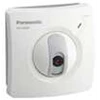
Detail PANASONIC IP CAMERA NETWORK KX-HCM10CE ( Home Use)
Panasonic Network Camera KX-HCM10CE ( Home Use)
Features:
Remote Pan/ Tilt operation
A wealth of Network Camera control functionsWith the " Pan/ Tilt operation" that changes the Network Camera direction, you can control the Network Camera and monitor from remote locations. Also, the following functions are included.
Click to Center When you click any certain point on the Single Camera screen, that point is centered on the screen.( * 1)
Pan ScanYou can move the Network Camera in a horizontal direction.
Tilt ScanYou can move the Network Camera in a vertical direction.
Preset Positioning( * 2) Preset Positioning allows you to fix the Network Camera in a specific direction.
Easy Installation ( Having “ Integrated web server ” built-in)
With " Integrated web server" built-in, you can connect to the Internet or LAN directly without devices to send images. Only connects a power supply and 10 Base-T Ethernet.
Easy monitoring ( Monitoring by web browser on the network)
You can view camera images easily after entering the Network Camera IP address in the web browser. You don’ t need to install or set special software.
External I/ O
The Alarm mode in the Image Transfer feature requires that external sensors/ devices be connected to the External Sensor Input of the External I/ O. You can transfer images as the sensor is detected when set to " Transfer in the Alarm mode" .
Multi Camera Screen
" Multi camera" function( * 3) that monitors 4 Network Cameras at a time on the browser window. Requires no software or operations that enter the address to switch among cameras.
Saving image
You can save about 80 frames ( * 4) to the integrated memory. You can save images to specify a day of the week, time and refresh interval of recording.
Transfer mode
" Transfer in the Alarm mode"
Transferring the image via e-mail or FTP when the alarm trigger is active.
Notifying by e-mail without transferring the image.
" Transfer in the Timer mode"
Transferring the image via e-mail or FTP when the timer trigger is active. The timer trigger can be activated by entering the active time on the Image Transfer window.
The timer mode uses the Network Camera internal clock. Please make sure Date and Time have been configured.
Viewnetcam.com compatible ( FREE DDNS service)
You can get your personal web address for your Panasonic Network Camera.
It' s FREE of charge! Please access www.viewnetcam.com for more information.
Viewing still images on your mobile phone
A compatible mobile phone allows you to view still images over the Internet as well as control the motion of the camera.
Please refer to the technical information for more details.
Server
Image compression : JPEG/ 3 Levels
Video resolution : 640 x 480, 320 x 240 ( default) , 160 x 120
Frame rate : Max. 15 frames/ second ( 320 x 240, 160 x 120) . Max. 7.5 frames/ second ( 640 x 480) .
Security : ID/ Password
Supported protocols : TCP, UDP, IP, HTTP, FTP, SMTP, POP3, DHCP, DNS, DDNS, ARP, ICMP, NTP
User access limit : Max. 10 simultaneous users
Buffered images : About 80 frames ( 320 x 240) with time information
Image transfer method : SMTP, FTP
Image buffer/ transfer triggers : Alarm and Timer
Network Camera
Zoom : 100% or 150%
Viewing angle : Right and left 45° ( totally 165° by Pan Operation) ; Up and down 33° ( totally 78° by Tilt Operation)
Pan ( horizontal direction) : - 60° to + 60°
Tilt ( vertical direction) : 0° to - 45°
Sensor type : 1/ 3 inch CMOS. 320, 000 pixels ( Effective Pixels)
Lens focal point : Fixed 1 m-Infinity
Lens brightness : F1.8
Required light intensity : 10-10, 000 lx
Audio
Not Available
Wireless
Not Available
Terminal
Not Available
General
Operating temperature : + 5° C to + 40° C
Operating humidity : 20% to 80% ( No Condensation)
Dimensions ( H x W x D) : 116 mm ( 4.57" ) x 115 mm ( 4.57" ) x 72 mm ( 2.83" )
Weight ( only the unit) : 350g ( 0.77 lb.)
Power supply ( E) : AC adapter code length: 5m. Input 100-240 V AC, 50/ 60 Hz Output 9 V DC
Power supply ( CE) : AC adapter code length: 5m. Input 100-240 V AC, 50/ 60 Hz Output 9 V DC
Power supply( US) : AC adapter code length: 5m. Input 120 V AC, 60 Hz Output 9 V DC
Consumption : Standby: 6 W, MAX.8 W
( * 1) Only range of movement( Right and left: ± 60° , up and down: 0- -45° )
( * 2) You can set 8 directions for PC. You need to set these in the PC prior to use.
( * 3) You can use after first registering the address of another Network Camera to that Network Camera.
( * 4) At a resolution of 320x240 in standard mode ( When the file size is 13KB per image)
Untuk penawaran harga dan pemesanan serta informasi produk lebih jelas silahkan hubungi kami di:
Hotline ( 24 Jam) : 021-85414123 / 021-29464373
CDMA : 021-99771148 / 021-92822627
GSM : 08561118486 ( WA/ Line/ WeChat/ Viber)
PIN BB : 7E82B6F8
E-mail : onepro_ solution@ yahoo.com
Tampilkan Lebih Banyak